

December 31, 2008
David Lang
Today, my thirteen-year-old son remarked that he couldn't believe how quickly 2008 had flown by. I thought to myself, "Think how I feel, kid!" For me, 2008 has been something of a blur—partly because time flies faster for a man pushing forty than it does for a boy of thirteen, and partly because this year has brought so many changes at such a breakneck pace. This is especially true where Accordance is concerned. Here are a few of the changes we've experienced this past year:
Version 8 in '08: By far the biggest change has been the release of a new version of Accordance. Accordance 8 was released in May of this year, with a host of new features, including the groundbreaking INFER command, the FUZZY command, Key Number Highlighting, Favorite Workspaces, Color backgrounds and custom leading, horizontal panes, Unicode import, and much more. As if that weren't enough, we released a free update to 8.1 in November, with an updated user interface, improved editing of user notes, new links in user tools, enhanced diagramming, and (need I say it again?) much more. Obviously, our programmers have been very hard at work, and could certainly use a break in 2009. Don't worry, though, we're not planning on giving them one! ;-)
New look for web-site and packages: To coincide with the release of version 8, we developed a new look for our packages and redesigned the web-site, making it easier to navigate, find information, and complete your orders online. This has not been without its hiccups, but considering the extent of the changes made, it was actually a very successful transition. As for the new look, I think it's the best one Accordance has ever had, and from what we've heard, most of you agree.
Lots of new faces: The response to Accordance 8 far exceeded our expectations, and I'm afraid, gave our sales staff all they could handle. At the same time, we have so many book publishers wanting to make their materials available in Accordance that our module development staff has been putting in long hours trying to get all these new products out the door. Consequently, we've added new personnel to handle sales, tech support, module development, and application development. Each of these folks came in, rolled up their sleeves, and made an immediate impact.
New Accordance Trainers: In 2007, we began training regional Accordance trainers to conduct Accordance training seminars across the United States. In 2008, they began conducting their first training seminars, and we're very proud of the way they represented us. Thanks to them, we were able to offer more Accordance training seminars than ever before.
New Packages and Modules: 2008 saw the first release of Accordance packages on DVD rather than CD-ROM. This enabled us to simplify the delivery of Accordance content and to offer new bundles. Both the Library and Scholar's packages were revamped to include new modules and offer greater value, and we also released a wide array of new Accordance add-ons.
As you can see, I've got good reason for wondering where 2008 went. We've seen so many changes and worked so hard that we can't believe 2009 is just a few short hours away. How time flies!
December 17, 2008
David Lang
The other day I stumbled across an internet conversation between two employees of another Bible software developer. One made a disparaging comment about the price of our ESV Study Bible module (see Monday's post), and the other questioned the wisdom of pointing people to the "A-team."
The A-team? In case you're too young to remember, or old enough to remember but too sophisticated to have indulged in such low-brow entertainment, The A-Team was an eighties television show about a crack team of American commandos who are on the run for a "crime they didn't commit," and who work as soldiers-of-fortune helping those with nowhere else to turn. This got me thinking. How is Accordance like the A-Team?
Thinking Different: The A-Team was led by Colonel John "Hannibal" Smith, played by George Peppard. (This was back when "Hannibal" was still associated with an ancient Carthaginian general rather than with a fictitious cannibalistic serial killer.) The A-Team's "Hannibal" was known for coming up with unorthodox and even outlandish plans of action. As these plans would unfold, they would look increasingly hopeless, and Hannibal's insistence on moving forward would strike the other members of the team (along with the poor civilian being helped) as increasingly reckless and suicidal. Of course, as with all TV sitcoms, everything would work out in the end, and Hannibal would smile, chomp on his cigar, and announce, "I love it when a plan comes together!" This little catch-phrase soon worked its way into nineteen-eighties popular culture.
Like the A-Team, and Apple, we have a long history of "Thinking different" about Bible software. Many people over the years have looked at us like we were crazy for choosing to develop Accordance exclusively for the Mac. Why, they would ask, would we limit ourselves to five percent (or less) of personal computer users? Why not develop for Windows so that we could serve the widest possible audience? Our answer was always the same: our goal is to make the best Bible software possible, and the Mac enables us to do that in ways that Windows does not.
Just as Hannibal's plans gave every appearance of falling apart before they actually came together, there was a time in the late nineties when it appeared that the Mac platform might collapse underneath us. At the time, every other commercial Mac Bible software developer pulled out of the Mac market or simply let their Mac product die a slow death.
Now, of course, the Mac has become immensely popular and several Windows developers have come out with limited Mac versions of their software. Our biggest challenge this year has been keeping up with all the increased demand as new Mac users look for Bible software designed exclusively for Mac. "I love it when a plan comes together."
"A Crime They Didn't Commit": The A-Team was continually on the run from the Military Police for "a crime they didn't commit." Their commanding officer had ordered them to rob the Bank of Hanoi, which they succeeded in doing. Yet once their commanding officer was killed, there was no proof that they had been acting under orders. So they had committed the act, it's just that the act was not really criminal.
Unlike the A-Team, we're not on the lam and have never been charged with a crime, but after everyone else pulled out of the Mac market, we were sometimes accused of being a "monopoly." The thinking seems to have been that because Accordance was the only choice for full-featured Mac Bible software, the lack of competition would ultimately encourage us to become complacent. The fact is that we always had plenty of competition. Accordance is continually compared with Windows Bible programs, Mac freeware and shareware, and even web-based Bible study solutions. Throughout much of our history, we've had to sell potential users on the merits of the Mac platform as well as the merits of Accordance. That meant that we always had to offer something beyond the best that was available for Windows. Far from resting on our laurels, we have instead consistently had one of the most aggressive development cycles in the industry, which is why Accordance users have enjoyed graphical searching, statistical analysis, diagramming, cutting-edge research tools, root searching, INFER searching, and the like long before anyone else. Today, with two Windows programs offering Mac ports, one offering a Wine- and X11-based solution, and all the others capable of being run in Parallels or Fusion, no one can accuse us of being a monopoly. Nevertheless, Accordance remains the only real choice for users wanting a true Mac-based solution. Perhaps we're guilty after all.
"If you can find them": Those downtrodden, desperate souls wishing to hire the A-Team always had to find them first, and that wasn't necessarily easy. Because they were on the run, the A-Team had to arrange clandestine meetings with their potential clients, typically after putting them through a series of comedic tests.
The Accordance team can be somewhat hard to locate as well. We have an office for our sales staff, but the members of our development team all work out of their own homes. This has several advantages. First, it helps us keep our facility costs low and enables us to invest most of our revenue into ongoing development of the Accordance program and additional modules. Second, it frees us to hire the best people we can find around the world, rather than being limited to those people who are willing to move to Central Florida. Finally, most of us prefer working from home and you can't beat the commute! So while you won't find some impressive edifice of steel and glass with the Accordance name on it if you visit Altamonte Springs, you can nevertheless be sure that the Accordance-Team is happily hard at work.
Perhaps it's because I'm a product of the eighties, but I like this "A-Team" moniker. Now all we need is for Mr. T to endorse us: "I pity the fool who don't use Accordance!"
December 15, 2008
David Lang
We're very excited to announce that the ESV Study Bible is now available as an Accordance module. The print version of the ESV Study Bible was released in mid-October, and has already enjoyed record sales. Accordance is among the first Bible software programs to offer an electronic edition of this popular resource.
One reason why the ESV Study Bible has become such a runaway success is that it offers rich content in a beautiful format. It is literally crammed with full-color maps and images, attractive timelines and tables, and detailed study notes which follow the literary outline of each book. In addition, there are numerous articles discussing the literary divisions within the Old and New Testaments, introducing each Biblical book, giving historical background information, and covering such topics as doctrine, ethics, interpretive methods, the biblical canon, archaeology, the original languages of the Bible, and more.

In developing the Accordance module, we made every effort to preserve the rich formatting of the print edition, a fact which some of our users have already noticed. The Accordance module also features extensive linking to other Accordance modules and web resources.
Finally, a word about price. A couple of people (including another Bible software developer) have publicly criticized the price of the Accordance module, but as far as I can tell, the criticisms arise from a misunderstanding. The ESV Study Bible Notes come bundled with the ESV translation for $70. Those who already have the ESV, which includes everyone with Library 8 Standard or Premier, pay only $40 for the ESV Study Bible Notes. And of course, with ministry and academic discounts you end up paying even less. By way of comparison, the two Windows programs which currently offer the ESV Study Bible Notes (without the ESV translation) list it at $49.95. We've made every effort to make the Accordance edition of the ESV Study Bible Notes one of the best and most affordable editions available. As a result, we've seen the same enthusiastic response and brisk sales which the print edition has received.
December 11, 2008
Rick Bennett
Description of the Print Edition
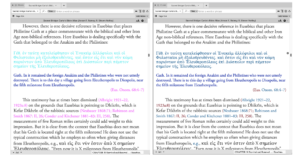
Our version of this module represents the revised edition of Comfort and Barrett's popular work, The Text of the Earliest New Testament Greek Manuscripts (Tyndale House Publishers: 2001). This is an important work for New Testament studies because it gives access, in one volume, to transcriptions of some of the earliest New Testament papyri, along with some additional majuscules. There are transcriptions of 69 manuscripts dating from the early 2nd to 4th centuries CE. In addition there are introductory remarks for each text, some of which are very extensive (such as the one for p4, 64, 67). Also of value are the many transcriptional notes made by the editors to explain some of the notable features of the texts, along with difficulties in the transcription process. Note: Due to licensing restrictions, the images contained in the print edition are not included in our edition.
Enhancements to the Accordance Edition
Personally, I've been anticipating the release of this project since I heard about it last year. We didn't settle for simply producing an electronic edition of the book (although that in itself would have been very useful). Instead, we've created three modules out of it.
One of the reasons we were interested in this work was so that we could use the texts it contained to add to our growing collection of tagged NT MSS. However, the problem we were faced with was how best to organize them. Creating 69 different texts would have been cumbersome to develop, as well as organize and use within Accordance. So, the decision was made to treat it as we did the Dead Sea Scrolls Biblical Manuscripts, and create two texts: one in canonical order (GNTPAP-C), and one in manuscript order (GNTPAP-M). The former is a complete collation of the individual texts according their corresponding book/chapter/verse, a task which would be virtually impossible with the print edition (you would literally have to flip back and forth through the book for each verse you are working in, in order to accomplish anything similar), the latter a transcription of the texts in manuscript order as they appear in the print edition.
The texts also include full morphological tagging, giving you the ability to search for specific forms, including nomina sacra, and numerals. You'll also notice that we've used our majuscule font, Sylvanus, which gives the texts a more authentic look. Then, we made the introductory material and transcriptional notes into a reference tool (GNTPAP-M Notes) that can be viewed as a separate tool (fully searchable, and indexed with 8 different fields), or in parallel with the texts in manuscript order.
One of the highlights of the SBL Annual Meeting was being able to demonstrate this new tool to the many scholars present. The feedback was overwhelmingly positive, and I was happy to see that many specialists in NT Textual Criticism and Papyrology were pleased with the work. I also got to spend some time with Philip Comfort, one of the editors of the book, to show him what we had done — he was very pleased as well.
When you combine this new module with the other text-critical tools that Accordance offers, you get some of the most advanced tools for text-critical research currently available. In an upcoming post I'll show some examples of how this can be used in coordination with the newest version of the CNTTS Apparatus, the NA27 Apparatus and some of our other tagged NT MSS.
December 10, 2008
David Lang
Last year at SBL, someone remarked about the Accordance booth that it looked like there was actual research going on. I answered that indeed there was. It is not unusual to have users come to the booth and ask for help constructing a complex search.
At this year's SBL, I had someone ask for help in finding every Hebrew verb which appears in the Nifal stem but which never appears in the Qal stem. I was actually impressed with how close he had gotten. In one tab, he did a search for [VERB Nifal] to get all the Nifal verbs in the tagged Hebrew Bible (BHS-W4). Then he opened a second tab, and did a search for [VERB Qal] to get all the Qal verbs. Now he just needed a way to find all the verbs which were found by the first search but which were not found by the second.
To do this, he opened a third tab and used the HITS command. For those of you who are unfamiliar with the HITS command, it basically represents the list of hit words from another search tab. In this case, he needed two HITS commands to use the results of the two previous searches. The trick was how to relate them to each other.
His first thought was to separate the two HITS commands with a NOT command, like this:

Note: Remember that we're searching in Hebrew, so all of these examples should be read from right to left.
However, when he clicked the Details button and looked at the Analysis tab for this search, he saw words listed there which he knew sometimes appear in the Qal stem. Why had this search failed? By using the NOT command, he had set up a search with two elements. The first element was a verb from the list of Nifal verbs. The second element was a verb from the list of Qal verbs. This search would find every verse where a verb from search 1 was not in the same verse as a second verb from search 2. However, this search would not exclude the possibility that the first verb might appear in the results of both search 1 and search 2. What was needed was a way to search for a single group of verbs which met the criteria of being found by the Nifal search but which did not meet the criteria of being found by the Qal search.
Whenever you want to find a single item which meets more than one criteria, you join those criteria together using the at symbol (@). If you want to negate one of those criteria, you do so by using a minus sign (-). So we selected the NOT command and replaced it with -@, like this:

The problem with this search was that we got an error message complaining about our use of the minus sign. I didn't understand what I had done wrong at the time and began wondering if this was a bug or just a limitation of Accordance. Perhaps two HITS commands could not be joined by the at symbol. I promised the user I would discuss this supposed limitation with the programmers and was about to apologize that Accordance couldn't do what he was asking, but after years of working with Accordance, I knew there had to be a way. I decided to try doing this search using the Construct window.
The Construct window lets you define complex word relationships using a simple drag-and-drop interface. There are times when you can accomplish things with the Construct window which you can't accomplish with a text-based search. Each column of the Construct window represents a different word or element of your search, and the space above the columns lets you define relationships between those words. Since the HITS command is available in the Construct window, I tried the following:

This search worked beautifully. By clicking the Details button and looking at the Analysis tab, we were able to get a list of verbs which appear in the Nifal but which never appear in the Qal (at least, never in the Hebrew Bible). We were even able to verify that these verbs never appear in the Qal by choosing Set Analysis Display and specifying that we wanted the search results broken down by Stem.

At that point, the user who had been trying to construct this search just kept saying, "That's beautiful!" It was only after he had left that I discovered why the text-based search using the at symbol had failed. It was due to confusion about the text order of the combined right-to-left and left-to-right text. Because I had selected the NOT command (which is left-to-right English text) and replaced it with -@, Accordance then interpreted these symbols in left-to-right order. That meant that it saw the minus sign as coming before the at symbol, rather than after it as it should. Had I replaced the NOT symbol with @- the search would have worked, though it would have looked like I was negating the first HITS command:

Because of this potential for confusion, it is often best when constructing Hebrew searches to start each search from scratch rather than trying to modify a previous search. Had I just started over and entered [HITS Nifal], the at symbol, the minus sign, and [HITS Qal], the search would have worked correctly and appeared correctly:

If you compare this last screenshot with the screenshot of the search which failed (the second screenshot above), you'll notice a subtle difference: the at symbol and minus sign in the latter search appear in the larger Hebrew font, rather than the smaller English font. For obvious reasons, Accordance interprets text in the Hebrew font from right-to-left, and text in the English font from left-to-right.
Confused yet? I was tempted just to gloss over this mistake of mine because it's somewhat hard to explain, but decided it may be helpful to some of you Hebrew power-users out there. For the rest of us, here are the morals of this story:
1. If you want to create a sophisticated search in Accordance, don't give up and don't be afraid to ask for help. (Okay, so you may not have access to an Accordance employee at a conference, but there's always the user forum).
2. Use the at symbol (@) rather than a search command to define single items which must meet multiple criteria.
3. If you can't get a search to work in the main search window, try using the Construct window.
4. Because of ambiguities in mixed left-to-right and right-to-left text, it is sometimes cleaner to enter a search from scratch rather than trying to modify some previous search.
It's always fun at SBL to try to get a challenging search to work, even when I don't get it right the first time. Once we do get it to work so that users can continue their research, the response is always the same: "That's beautiful."
December 5, 2008
Helen Brown
It's official now: we are completely crazy!
Just as we get into full gear for the December sale, we plan to move the entire website to a new server and a new underlying system. You may not see much difference until you place an order, but you need to know that:- The website and downloads will stay up, but once we notify the DNS servers of the move, it will take at least 24 hours for everyone to be directed to the new site.
- The Blog and Forum will be closed and unavailable for several hours.
- The online store will also be closed for several hours. You can place your order up to 11 am EST, but we may not be able to process it until we can access the new store ourselves.
Our email service should not be affected, it's already on the new server (and much more reliable).
December 3, 2008
David Lang
Throughout the month of December, we're offering a sale on all of our primary collections, along with many of our most popular add-ons. You can get a complete list of sale prices here.

Also available for the first time, you can now purchase gift certificates for your friends and loved ones.
So call or order online today. Operators are standing by! ;-)